
On the Minnesota Star Tribune website there's a paywall system that blocks the user from viewing the full content of articles if they're not a subscribing member. In this case it's called a soft paywall. It's the same kind of paywall system that every news publisher has, so you've seen these a million times already.
Generally, you can use reader mode to get around these paywalls to view the article. But the other day I mistakenly stumbled on a new way to do it for the Star Tribune: if you scroll down to the bottom of the page as soon as the content loads but before the paywall library loads the pop up you're still able to view the entire article along with the paywall pop up. Essentially you just got to race the paywall library to the bottom of the page before it can load.
In this post I'll break down how this is possible as well as talk about a couple solutions that could prevent this. This isn't a call to freeload content from the Strib or rip on their architecture. Far from it, they're an important organization with smart engineers who deserve all the revenue they can get. I'm writing this as an engineer who noticed an interesting timing issue and wanted to offer some possible fixes. My hope is that this is useful to other developers curious about how paywalls work and maybe helpful to the Strib's engineering team (or other teams using similar paywalls) if they want to tighten things up a bit. This is a common pattern across the publishing industry, so understanding it benefits anyone building or maintaining online subscriptions.
Default paywall placement
New users to the website viewing the page as a logged out non-subscriber will see the page load normally. When they start to scroll to view the content down the page the paywall pops up and blocks them from viewing the rest of the page. Below is the default paywall placement at the bottom of the screen when the user loads the page.

A race to the bottom
If the user waits until the page fully loads then starts scrolling down the page they will hit the bottom of the page before the paywall system can stop them. Here is what happens if the user scrolls quickly to the bottom of an article before the service kicks in. You see they're able to get to the bottom while loading the entire contents of the web page but also seeing the paywall pop up blocker.
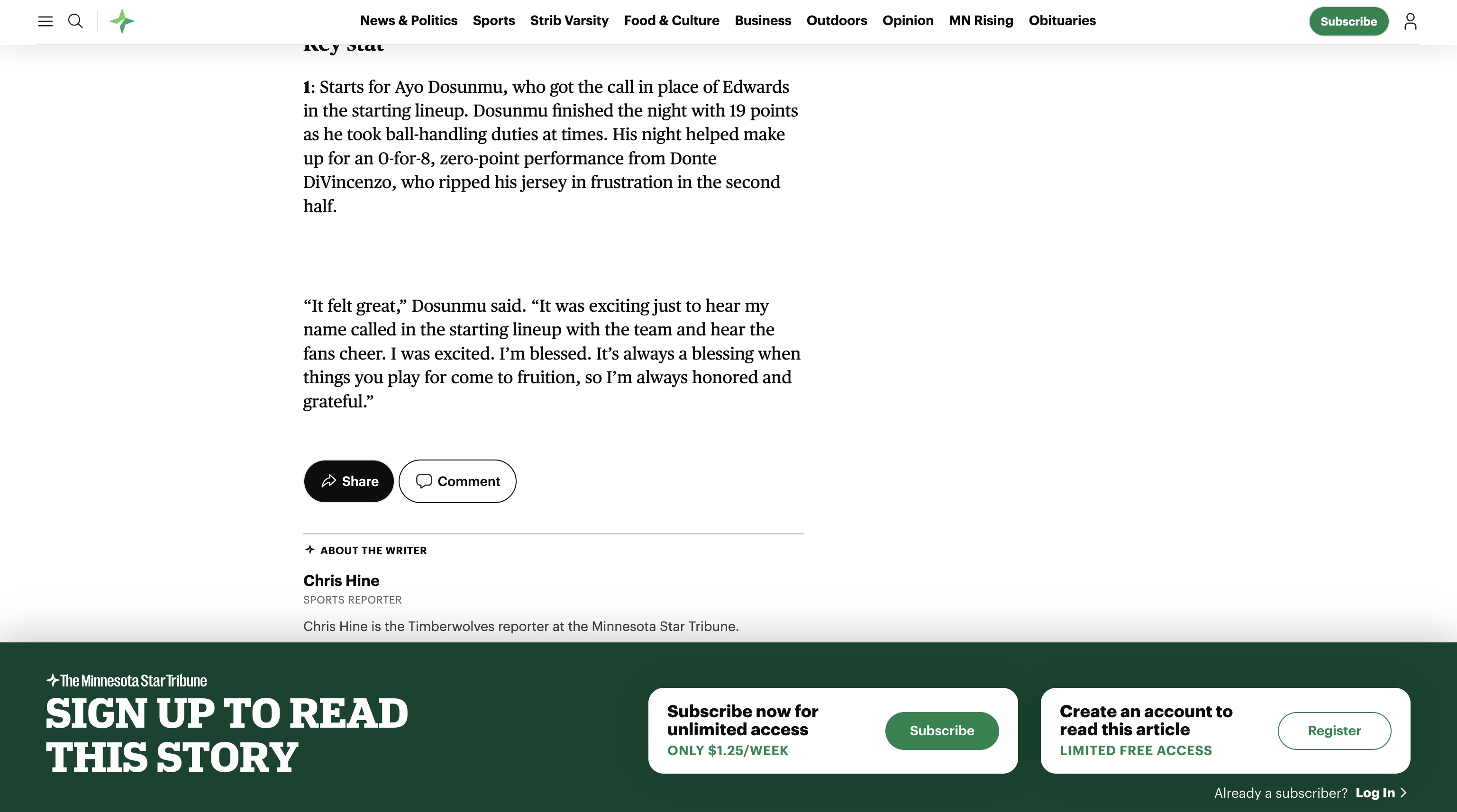
How this paywall works or how I think it works
When a web page loads on startribune.com the entire HTML is served from the server to the client. After the client has rendered the HTML, the paywall is triggered by the service library called Piano. The Piano paywall system then uses javascript and CSS to hide any content in the article that is below the bottom of the current user's position. As long as the user doesn't scroll down the web page during the in-between time after the content loads but before the Piano paywall code is rendered everything works just fine.
The constraint most likely has to do with SEO and how Google can penalize websites that serve one form of content to indexers and another to human users. Google wants the full text to index. If publishers want their articles to rank, the full text needs to be in the HTML that Google receives.
Anyone who opens dev tools, reader view or disables JavaScript can read the article but I think publishers already know this. I think it's understood that by creating enough friction so that the average reader subscribes then it's worth the effort to have the paywall and not a huge concern if a few nerds are able to get around it. After all, the majority of users who end up subscribing are not going to discover this little workaround.
This isn't a bad implementation or hacky in any way. It's actually pretty standard for a soft paywall and a lot of major news publishers use this implementation. The Strib is using Piano correctly. The tradeoff they're navigating is due (most likely) to allow Google to index each page for SEO while blocking non-subscribers from reading content for free.
There's actually a way that Google does allow for publishers to limit what's indexed by Google and what is consumed by a non-subscriber that I'll cover in the next section.
Ways to fix the issue
That said, if a publisher wanted to tighten this up without sacrificing SEO, there are some approaches.
CSS - Instead of relying on the component to apply the content clip after hydration, you can use CSS in the
to block the content from being visible. A max-height and overflow: hidden on the article container, applied right away when the page renders, would close the scroll race condition. The full text is still in the DOM so view-source and some developer tool fiddling still works, but the visual bypass is gone.Render everything server side - Check if the user is a logged in subscriber at the server level. If the user is a subscriber then send the full HTML back to the browser. If they're not and you want to paywall them, then just send the first few paragraphs in the HTML and a flag to trip the paywall system. When Google indexes the page they get the lede and structured data which should be enough for indexing and snippets. Users can't race the JavaScript because the remaining content isn't in the DOM to begin with. The Financial Times does something similar to this, I believe. You lose some SEO value from the full body text, but you eliminate the race condition entirely.
Structured data - This is the way to limit what content is loaded based on who the requesting users or bot is. Google explicitly supports serving full content to crawlers and truncated content to users, as long as you mark it up correctly. You add isAccessibleForFree: False and a cssSelector to your NewsArticle structured data so Google knows which content is paywalled. Then you use server-side user-agent detection to serve the full HTML to the Googlebot and the truncated version to browsers where users are not logged in.
Adding the NewsArticle structured data would look something like this:
<html>
  <head>
    <title>Article headline</title>
    <script type="application/ld+json">
    {
      "@context": "https://schema.org",
      "@type": "NewsArticle",
      "headline": "Article headline",
      "image": "https://example.org/thumbnail1.jpg",
      "datePublished": "2025-02-05T08:00:00+08:00",
      "dateModified": "2025-02-05T09:20:00+08:00",
      "author": {
        "@type": "Person",
        "name": "John Doe",
        "url": "https://example.com/profile/johndoe123"
      },
      "description": "A most wonderful article",
      "isAccessibleForFree": false,
      "hasPart":
        {
        "@type": "WebPageElement",
        "isAccessibleForFree": false,
        "cssSelector" : ".paywall"
        }
    }
    </script>
  </head>
  <body>
    <div class="non-paywall">
      Non-Paywalled Content
    </div>
    <div class="paywall">
      Paywalled Content
    </div>
  </body>
</html>
Piano-specific fixes
Since Piano is already being used and is a common paywall provider, here are a few Piano specific approaches that could close this race condition. None of these fixes alone will satisfy Google's SEO rules. To make them work, you need to implement the NewsArticle structured data fix in conjunction with these Piano specific fixes.
CSS-first content lock - Hide paywalled content by default before Piano even loads. Add CSS in the <head> that hides the content, then let Piano reveal it for authorized users. This inverts the problem so the content is hidden by default rather than hidden after load.
/* In <head> before Piano loads */
.paywall {
  display: none;
}
Blocking initialization - Piano can be configured to block rendering until access is determined using the tp.push method. This delays content visibility until Piano has verified the user's access level.
tp.push(["init", function() {
  // Content only becomes visible after Piano initializes
  // and determines user access
  document.querySelector('.paywall').style.display = 'block';
}]);
Server-side access check - Piano offers a server-side API that lets publishers determine access before rendering HTML. This moves the decision to the server, eliminating the client-side race entirely. It's more work to implement but closes the gap completely.
All software and paywall systems have tradeoffs between SEO, user experience and security. These are just a few ways organizations can protect their paywall content. I am sure there are many other methods available. These are just a few that came to mind. Each business needs to find the balance that works best for them.